
Outreach Settings
SpeakerDrive writes your emails from a few inputs. Change the inputs, and every email changes with them.
The four inputs
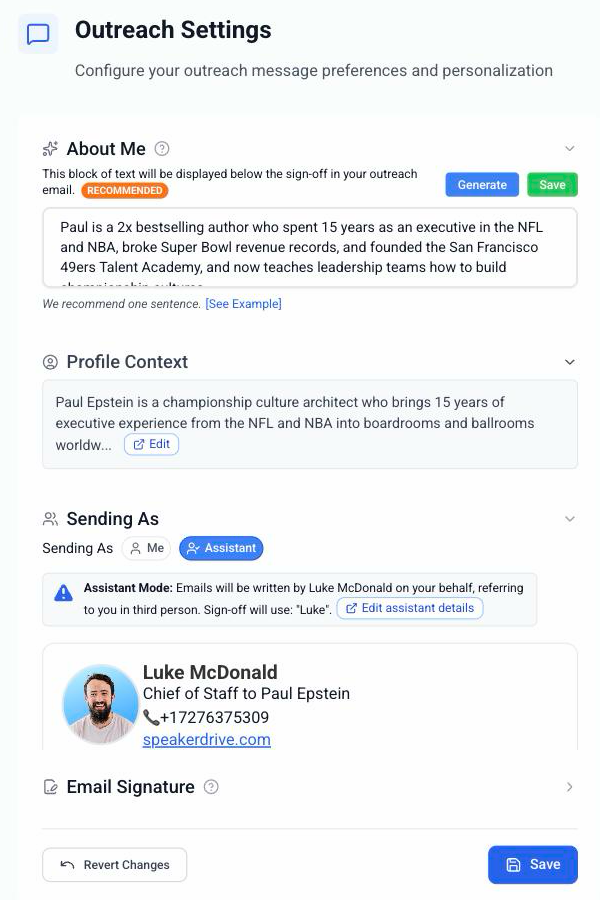
Your bio. Settings → My Profile. Who you are and what you speak about. The writer leans on this most. Outreach Settings shows it as Profile Context.
About Me. Your angle in one sentence. "I speak on leadership through digital transformation." It appears under your sign off in every email. Click Generate to get a draft, then make it yours.
Sending As. Me, or my assistant. Changes the signature and the voice.
Templates and signature. Your own copy in any stage, and the block at the bottom of every email.
Where to find them
Settings → Outreach Settings holds About Me, Profile Context, Sending As, and a shortcut to your signature. Your bio and templates each have their own page under Settings.
Tip: Change a setting and it applies to every lead you unlock from then on. Emails already written keep their words.